What types of files does Purview Information Protection support?


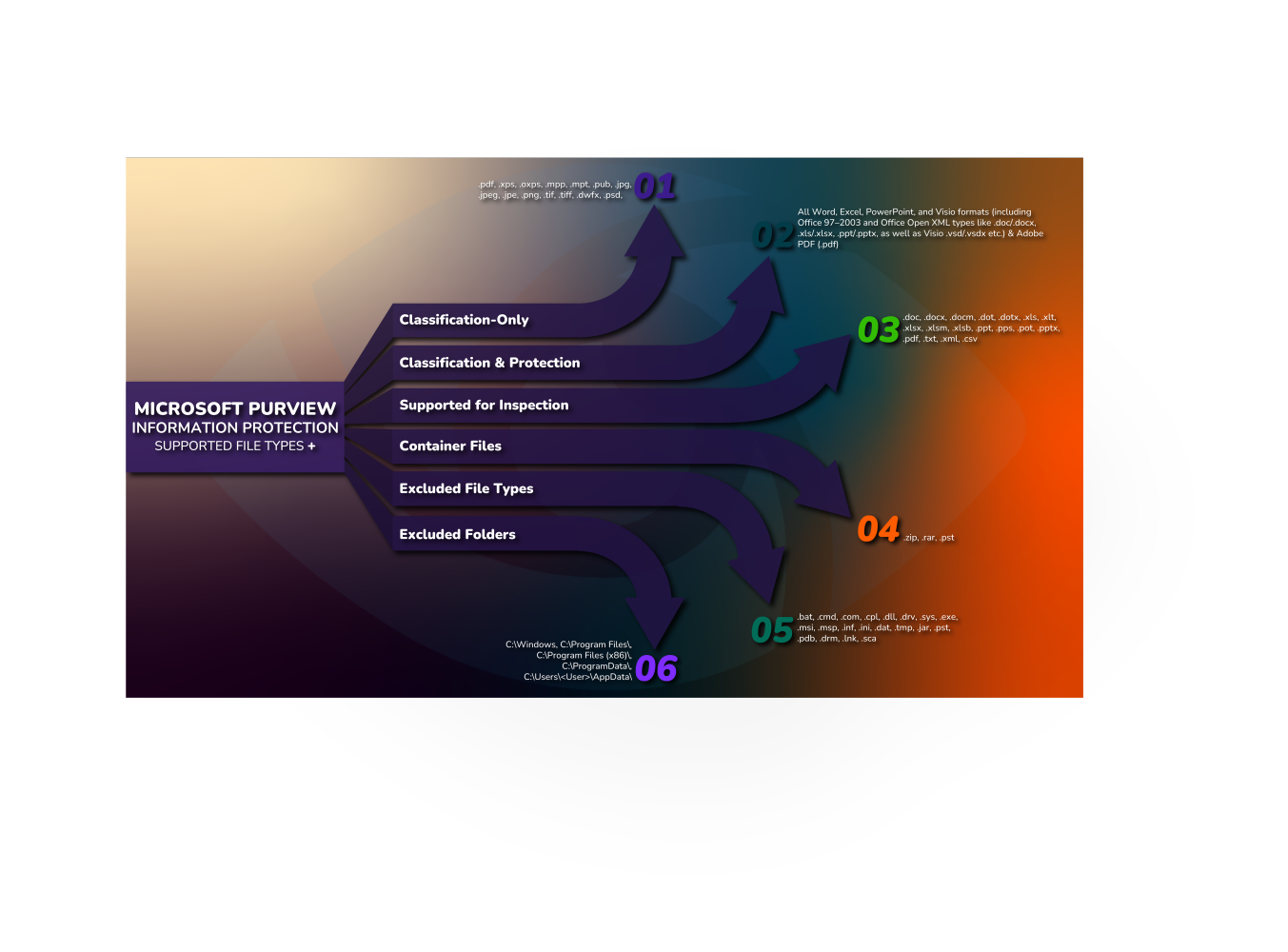
I'm losing count of how many times I have to answer that question. And, since there are multiple pieces of documentation related to it, it's not a straightforward answer. We'll go through the multiple categories associated with this question, and I'll also provide a companion infographic to go along with it (file download at end of article) 🙂
Classification Only
File types that support applying a sensitivity label (classification) without encryption. These include:
- PDF and XPS documents – Adobe PDF (.pdf) and Microsoft XPS (.xps, .oxps) files can be labeled with MIP
- Microsoft Project & Publisher files – MS Project (.mpp, .mpt) and Publisher (.pub) files support classification without encryption
- Image files – Common image formats (.jpg, .jpeg, .jpe, .png, .tif, .tiff, etc.) can be assigned labels without encryption
- Design and graphics files – Autodesk Design Review (.dwfx) and Adobe image formats like Photoshop (.psd) and Digital Negative (.dng) are supported for classification-only labeling
Protection (Encryption) Only
File types that do not support storing a label on the file but can be protected by encryption. In these cases, the client applies generic encryption (wrapping the content in a .pfile container):
- Plain text and data files – Formats like plain text (.txt) or CSV/XML (.csv, .xml) cannot persist a label by themselves; they can only be protected by encryption (e.g. a .txt file becomes .ptxt when protected)
- Unsupported Office add-ins – Certain Office-related files such as Excel add-ins (.xla, .xlam) cannot be labeled, but can be encrypted (e.g. .xla becomes .pxla when protected)
- All other file types – Any file not natively supported for labeling falls in this category. These can only be protected via generic MIP encryption, which encapsulates the file and changes its extension to a .pfile (or a .p<original> extension)
Classification and Protection
File types that support both sensitivity labeling and native protection (encryption). These files can have labels embedded and be encrypted without changing their original format:
- Microsoft Office documents – All Word, Excel, PowerPoint, and Visio formats (including Office 97–2003 and Office Open XML types like .doc/.docx, .xls/.xlsx, .ppt/.pptx, as well as Visio .vsd/.vsdx) fully support MIP labels and encryption natively (the file extension remains unchanged when encrypted)
- PDF files – Adobe PDF (.pdf) supports both classification and protection. The MIP client can apply labels to PDFs and encrypt them (using PDF’s integrated protection format)
Supported for Inspection
According to Microsoft, the MIP client leverages Windows IFilter for content scanning. Because of this, certain file types can be inspected for Sensitive Information when using the Set-FileLabel PowerShell cmdlet. Supported for inspection are:
- Word documents: .doc, .docx, .docm, .dot, .dotx
- Excel spreadsheets: .xls, .xlt, .xlsx, .xlsm, .xlsb
- PowerPoint files: .ppt, .pps, .pot, .pptx
- PDF documents: .pdf
- Text/CSV/XML files: .txt, .xml, .csv
Container Files
Common container/archive file types (which contain other files) and their support:
- ZIP archives (.zip) – The scanner can inspect .zip files for sensitive content (with the Microsoft Office iFilter installed for indexing inside the archive)
- RAR archives (.rar) – .rar files are considered container files, but by default the MIP scanner excludes them from inspection
- Outlook PST files (.pst) – Outlook Personal Store files (email archive containers) are excluded from labeling by the MIP client
Excluded File Types
Certain file types are automatically excluded from MIP classification and labeling to avoid altering system-critical or unsupported files. Users will receive a message if they try to label these. The excluded extensions include:
- Batch/Command files: .bat, .cmd, .com, .cpl
- System/Driver files: .dll, .drv, .sys
- Executable programs: .exe
- Installer packages: .msi, .msp
- Config/Data files: .inf, .ini, .dat, .tmp
- Other miscellaneous: .jar, .pst, .pdb, .drm, .lnk, .sca
By default, the MIP scanner also excludes these same file types from processing, to match the client behavior.
Excluded Folders
The MIP client will not classify or label files in certain system folders by default. The following directories are excluded:
- Windows system directory: C:\Windows
- Program Files directories: C:\Program Files\ and C:\Program Files (x86)\
- ProgramData: C:\ProgramData\
- AppData (per user): C:\Users\<User>\AppData\
Each of the above locations and file types is not processed by MIP to ensure stability and avoid interference with system or application files. These defaults can be adjusted in scanner configuration if needed, but the out-of-box settings from Microsoft are as listed.
-
Please feel free to download the infographic below for a higher resolution. Happy to answer any questions!