Heads up for anyone building DLP policies in Microsoft Purview

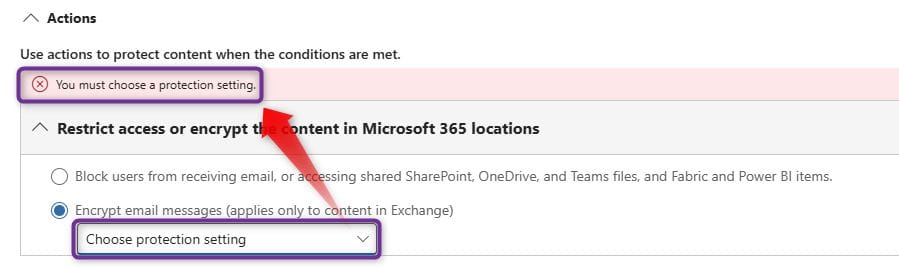
You may have noticed that the “Choose Protection Setting” dropdown is no longer functional when selecting “Encrypt email messages.” It's not a bug, just a shift in how Microsoft handles email encryption.
The native DLP action now expects encryption to be managed via Sensitivity Labels, not legacy protection templates.
If your policy can’t save, this is likely why. To fix:
→Enable Azure Rights Management
→Create Sensitivity Labels with encryption
→Apply those labels in your DLP policy
While Microsoft has documented the shift towards using sensitivity labels for email encryption, the specific changes in the DLP policy interface (such as the non-functional 'Choose Protection Setting' dropdown) aren't clearly detailed in the official documentation. This change is live, and it's worth being aware of the new approach.