Purview Encryption Revocation Nuance (or "I thought it worked this way, why does it not work this way?")


I've been doing my best lately to help out on the Microsoft Purview Subreddit and I thought this one was interesting enough to ramble on about.
What Happen ?
1. A Word document was created locally and AutoSave placed it in OneDrive.
2. A sensitivity label that encrypts was applied. The permissions covered the external recipient (the first attempt used "Any authenticated users"), with offline access set to 0 days.
3. The file was then attached to an email from Outlook's browse dialog (ie., the OneDrive folder on disk) and sent to an external recipient.
4. They tried to revoke access from Word. Word refused because revocation isn't supported for files stored in OneDrive or SharePoint.
5. They opened the copy in Sent Items and revoked that one instead. Word accepted it. The recipient could still open the file.
6. Separately, they sent an encrypted email to an external recipient. Sent Items offered no revoke option, and Outlook's message recall didn't do a thing because the recipient is outside the organization.
"aren't all of these copies the same content, carrying the same content ID, revocable in one place?"
Well, the copies do share an identity; however, the revocation functionality isn't hooked into the actual file location, nor is it hooked into how the email was delivered.
Ok...explain??
There is no single "Purview" that owns the file. There are (3) separate access control systems that touch it, and each of them revokes a bit differently.
1. Azure Rights Management
When a label that encrypts is applied the client generates a content key, encrypts said file, and then embeds a publishing license into it. That license dictates who gets which usage rights, whether an expiration date is configured, whether there's an offline access window, and a ContentID that names this encrypted instance.
Every open by an RMS-aware app sends that publishing license to the Rights Management service which authenticates the user, evaluates their rights, and then issues a use license.
Per Microsoft, this use license is a cert holding the user's rights and the content key, and for the label's offline-access period the user is not reauthenticated or reauthorized
For the above scenario, remember this:
-Protection travels with the copy. Regardless of whether you rename it, attach it, or copy it to USB: the publishing license goes with it.
-The identity of a copy is its ContentID, not its filename. Two identical copies will share one ContentID but a re-protected copy does not.
-Enforcement happens when the usage license is issued. Revocation means that the service declines to issue the next use license for a ContentID. It cannot reach into a use license already sitting on someone's machine, which is why the offline-access setting decides how fast a revoke can act on the file.
-The Rights Management issuer (i.e., the person who applied the label) always keeps Full Control and can still open a document after it is revoked.
2. SharePoint and OneDrive
When sensitivity labels are enabled for Office files in SPO and ODO, the service can decrypt labeled content so that search, DLP, co-authoring, and Office for the web work. You'll want to understand the side effect of this:
The very second a copy leaves (e.g., download, sync folder, email attachment), it becomes a fresh RMS object and is re-protected with the label's settings at that instant, and SharePoint's jurisdiction ends. The recipient's rights come from the label's permission set, not from any sharing link you could later remove.
3. Exchange and Message Encryption
Purview Message Encryption protects a message with the same RMS engine, but delivery is going to split on recipient identity. Microsoft 365 and standard Microsoft account recipients get the message inline in Outlook, which is decrypted with a use license under the same rules as a file.
Every other email provider (e.g., Gmail, Yahoo, one-time passcode) gets an email with a link to the encrypted message portal, where your tenant displays said email.
Only the portal path leaves a door that your tenant still controls after send, and that door is Advanced Message Encryption's revocation and expiration.
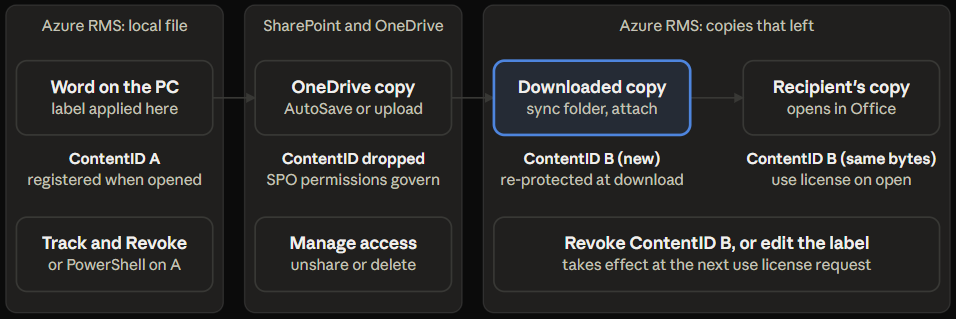
If you have to revoke something, ask yourself these questions three:
"which jurisdiction is the recipient's copy in right now?"
"what is that copy's ContentID?"
"when does the recipient's use license expire?"
When the recipient still opens the file, work through these in order so you can stop guessing and save your lunch hour:
1. A cached use license.
Microsoft is rather explicit that someone who already viewed a file keeps access until their use license expires. "0 days" should collapse that window to a session, but verify the setting actually took hold when you configured it.
OneDrive re-protects with the label's settings at download time, and Get-AipServiceDocumentLog reports the expiraton, offline access, and the revocation settings for a registered ContentID.
2. The wrong copy.
If the file you revoked was re-downloaded from OneDrive instead of saved out of Sent Items, it is a different ContentID. Run Get-FileStatus on the saved attachment and compare its ContentID with the one you can see in the portal.
3. The wrong tester.
The Rights Management issuer can still open a revoked document. A recipient cannot, so test with an actual recipient account.
4. The tracking log.
Get-AipServiceTrackingLog -ContentId <id> shows you granted and denied attempts with the included timestamps. Grants after the revocation time mean that the service is still issuing licenses for the second file, which is a solvable problem with a ContentID.
What actually works then?
nothing :(
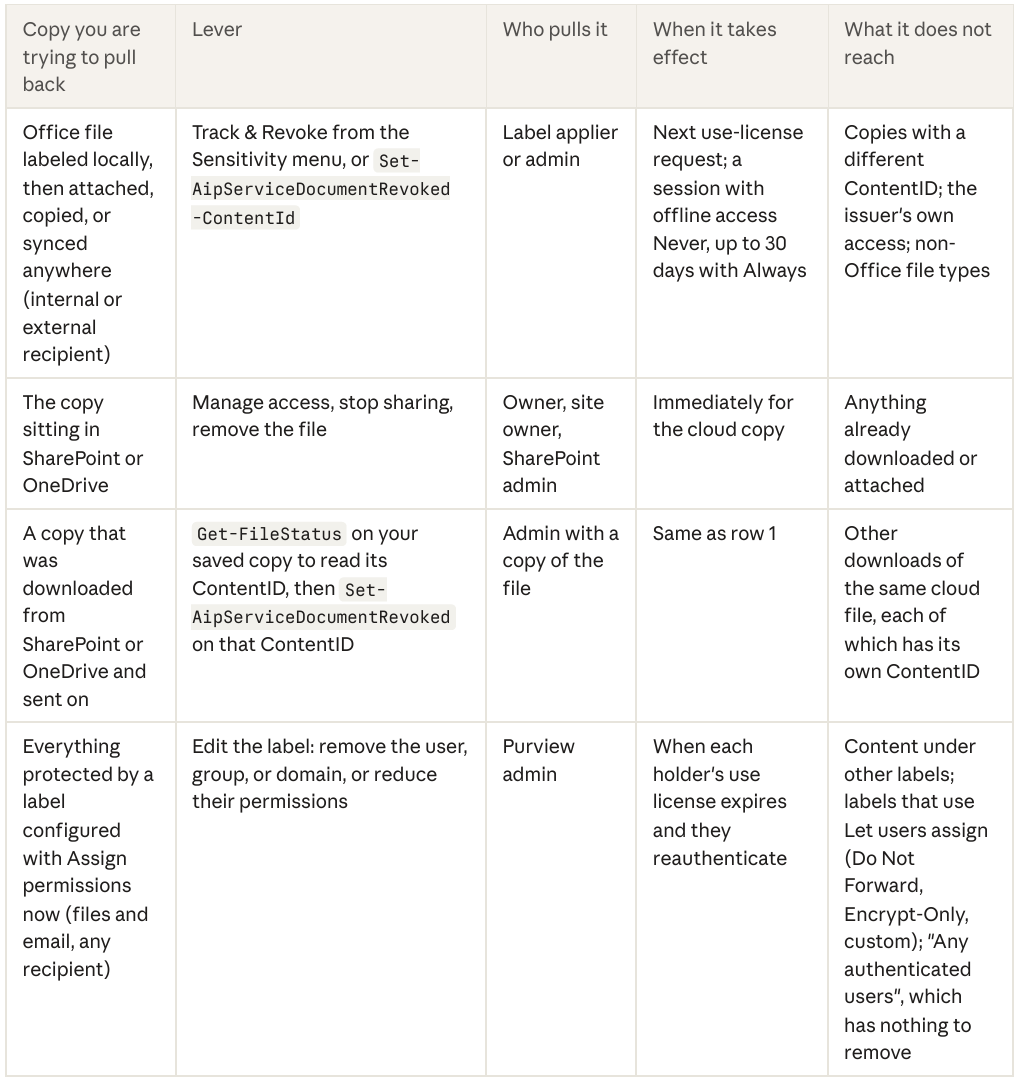
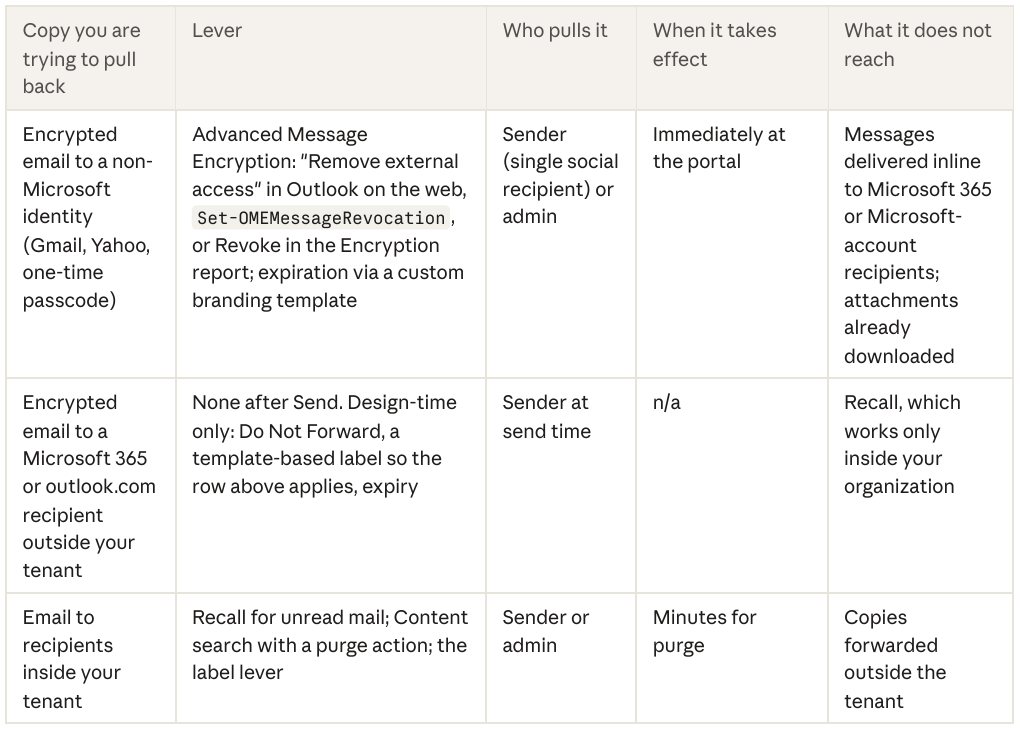
There are exactly (5) methods of revocation here and each one of them reaches a specific jurisdiction. Behold:
Note:
The label editing lever is the only one that will find every copy under a label regardless of what the ContentID may be, and it's there only for labels that have "Assign permissions now" configured. This is because the service evaluates the label's current permissions at each use-license request.
Revocation and expiration exist only for those messages read within the encrypted message portal, and Microsoft's own guidance for organizations that need that control is to force the portal for all external recipients with a custom branding template and a mail flow rule.
This is of course a business-case discussion, since you would be trading the inline experience your Microsoft 365 partners are used to for a security feature.
Design for revocability
Revocation is a design-time property. Every lever in the table above was either created or destroyed by a choice that was made in the label wizard or the OME configuration long before anyone hit Send and ruined your day. Here are the choices that matter listed in the order that they usually go wrong:
1. Stop using "Any authenticated users" for anything that you might need to revoke
There is no identity to remove from the label, so the label-edit lever is gone; the only remaining options are per-ContentID revocation of copies you can identify, or an expiry that was set at the onset. It also does not mean what most people think for documents: federated social sign-in and one-time passcodes work only for email, so a Gmail recipient opens a Word attachment only with a Microsoft account.
2. Scope external labels per relationship and use "Assign permissions now"
"Confidential\Partners" with the partner's domain or a group of their contacts gives you a lever that can get to every copy: remove the domain, and access ends when use licenses expire. A single tenant-wide external label turns that same edit into a business outage. Groups keep it simple but make note of the documented intermittent-access issue with mail contacts inside groups.
3. Set "Allow offline access" to Never for content you expect you'll need to revoke
Microsoft's own recommendation is Never for very sensitive data, 7 days as a balance, and Always only when 30 days of lingering access is deemed acceptable.
4. Set expiry on time-bound sharing.
Bids, due diligence, and contract negotiations have natural end dates. An expiry stamped into the label at protection time doesn't require anyone to remember to revoke.
5. Treat "Do Not Forward" and "Encrypt-Only" as convenience protection, not revocable protection.
User-defined permissions use the tenant's 30-day use-license default with no per-label offline setting, and their permissions cannot be edited after the fact. They stop forwarding and copying; they do not give you a way back in.
6. Decide which jurisdiction the recipient's copy will live in.
If the file lives in SPO, share a link, because SharePoint's access controls are then the revoke lever and every open is a fresh auth. If you email a copy, you have chosen RMS as the jurisdiction, so make sure that label carries the settings in points 1 through 4. Do not mix the two and expect either to cover the other.
7. If external email must be revocable, force the portal.
Deploy a custom branding template with a mail flow rule so every external recipient reads through the portal, and set an expiration on that template. Note that without Advanced Message Encryption licensing this lever does not exist at all.
8. Confirm tracking is on and clients register documents.
Get-AipServiceDocumentTrackingFeature shows whether registration is enabled for the tenant, and the Office capabilities table lists the versions that register local documents on open. A document that wasn't ever registered has no ContentID in the tracking log and cannot be revoked from the portal.
Here's a useful self-test for any label that encrypts: describe in one sentence how you would cut off a single external recipient six weeks after they received a copy. If the sentence starts with "we'd ask them to delete it", it's not revocable.
Tooling and reporting fun
Every lever in this post is usable via PowerShell, and PowerShell is where the sleuthing happens because the Office portal only sees registered ContentIDs. You'll need four modules:
-PurviewInformationProtection (the client)
-AIPService (the Rights Management service)
-Security & Compliance (labels)
-Exchange Online (message encryption)
Which ContentID does this copy carry?
Save the attachment out of Sent Items first because the client reads local files.
Get-FileStatus -Path 'C:\Temp\files-from-a-project.docx' | Select-Object FileName, IsRMSProtected, RMSTemplateName, RMSIssuer, ContentIdWho's been issued a license for it, and then revoke.
Registered documents only; if the log is empty, open the file once in a supported Office app to register it.
Connect-AipService
Get-AipServiceDocumentTrackingFeature

#Needs to be enabled or nothing below works

$cid = '00000-000000-0000-0000'

#from the previous run of Get-FileStatus

Get-AipServiceDocumentLog -ContentName 'files-from-a-project.docx' -Owner 'man@severian.com' -FromTime (Get-Date).AddDays(-30) -ToTime (Get-Date)
Get-AipServiceTrackingLog -ContentId $cid

#granted and denied attempts by user, time, and location

Set-AipServiceDocumentRevoked -ContentId $cid -IssuerName 'man@severian.com' Clear-AipServiceDocumentRevoked -ContentId $cid -IssuerName 'man@severian.com'
Every license request whether or not it has been registered.
The Rights Management usage logs record each use-license request with the ContentID, the requester, and the result across all copies regardless of tracking registration. These are your source of truth when the portal shows nothing.
Get-AipServiceUserLog -Path 'C:\RmsLogs' -FromDate (Get-Date).AddDays(-30) -ToDate (Get-Date).AddDays(-1) -NumberOfThreads 10

#For W3C logs: filter request-type AcquireLicense and match content-id to the GUID from Get-FileStatus
Which labels can't be revoked at all.
Run this before an incident. If you are here during or after an incident, I'm not the Time Being and I can't undo the past, but at least you have something in your toolbox for the future.
Connect-IPPSSession
Get-Label | Where-Object { $_.EncryptionEnabled } | ForEach-Object {    [pscustomobject]@{
  Label = $_.DisplayName
  Mode = $_.EncryptionProtectionType
  AnyAuthUsers = [bool]($_.EncryptionRightsDefinitions -match 'AuthenticatedUsers')
  OfflineDays = $_.EncryptionOfflineAccessDays
  Expiry = $_.EncryptionContentExpiredOnDateInDaysOrNever}
  } | Sort-Object AnyAuthUsers -Descending | Format-Table -AutoSize
Email...revocable?
Get the MessageID from a Message Trace and run the following:
Connect-ExchangeOnline
Get-OMEConfiguration | Select-Object Identity, ExternalMailExpiryInDays
Get-OMEMessageStatus -MessageId $messageId | Format-Table -AutoSize Subject, IsRevocable, Revoked
Set-OMEMessageRevocation -Revoke $true -MessageId $messageIdPurview Engineer Revocation Reference Card
Store these in your memory hole:
1. Revocation in Purview means that the Rights Management service is refusing the next use license for a ContentID. It never gets to a use license already granted, so the label's offline-access setting is the timer on every revoke attempt.
2. A copy's identity is its ContentID. Byte identical copies share one; anything re-protected receives a new one.
3. SPO and ODO re-protect admin-defined-permission files. The cloud copy has no ContentID to revoke, and every download creates a new one, which is why Word refuses Track & Revoke for cloud files and why revoking the original does nothing for downloads.
4. For the cloud copy, SharePoint's access controls are your lever. For any copy that left, the lever is a revoke of that copy's ContentID or an edit to the label.
5. Editing an "Assign permissions now" label gets to every copy under it at the next use-license request. "Let users assign" labels (Do Not Forward, Encrypt-Only, custom) are fixed at protection time and run on the 30-day tenant default.
6. "Any authenticated users" leaves no identity to remove and no revocation lever beyond per-ContentID revoke and expiry. Use this only for content that you would be comfortable never getting back.
7. Encrypted email is revocable only when the recipient reads it in the encrypted message portal, which requires Advanced Message Encryption and a non-Microsoft identity, or a custom branding template that forces the portal for everyone. Inline delivery to Microsoft 365 and outlook.com recipients cannot be revoked, and Outlook recall works only inside your organization.
8. The Rights Management issuer keeps access after a revoke, so never test revocation with the account that applied the label.
Sources
Track and revoke document access (Microsoft Learn, updated June 2026)
Track and revoke access to your files (Microsoft Support, updated June 2026)
Revoke email encrypted by Advanced Message Encryption (Microsoft Learn, updated June 2026)
Manage message encryption (Microsoft Learn, updated June 2026)
Get-FileStatus, PurviewInformationProtection module (Microsoft Learn)
Get-AipServiceUserLog, AIPService module (Microsoft Learn)